

Key Takeaways
- Mobile data is internet traffic that travels over your carrier's cellular network rather than Wi-Fi.
- Video streaming, cloud photo uploads, and app updates are among the heaviest consumers of mobile data.
- Background app refresh and auto-play videos can drain your allowance without any deliberate action on your part.
- Your phone's built-in data usage screen shows exactly which apps are responsible for consumption.
- Connecting to Wi-Fi whenever possible is the most direct way to reduce cellular data use.
Mobile data
Mobile data is the wireless internet connection your phone uses when it is not connected to Wi-Fi. It travels through your carrier's cellular network, the same infrastructure that handles phone calls and texts. Your carrier allocates a set amount each month, measured in gigabytes (GB), and apps on your phone consume that allowance every time they send or receive information over the cellular connection.
Data transfer over a cellular network uses protocols such as LTE (4G) or NR (5G). The generation of network you connect to affects speed, not the total amount of data you are allowed to use.
How mobile data actually works
When your phone is not on Wi-Fi, it connects to the internet through a network of cell towers operated by your carrier. Those towers relay data between your phone and the wider internet, the same way a Wi-Fi router does at home, just over radio frequencies instead of a cable.
Your carrier measures every byte of information that crosses that connection. Load a webpage: that counts. Send a photo: that counts. Watch a video: that counts, and it counts a lot. At the end of your billing cycle, the total is compared against whatever monthly allowance your plan includes.
Speed depends on which generation of network your phone connects to. A 5G connection transfers data faster than LTE, but speed does not change how much data an action consumes. Streaming the same video at the same quality uses the same number of bytes whether you are on 4G or 5G.
For a broader look at how internet connections work at home versus on the go, the guide to what your home internet plan includes covers the same concepts applied to fixed broadband.
What uses the most data
Video is the single largest category of mobile data consumption for most people. Streaming a movie at standard definition uses roughly 1 GB per hour. High definition can reach 3 GB per hour or more. Short-form video apps that auto-play clips continuously can burn through data just from scrolling.
Cloud services are a quieter but significant contributor. If your phone is set to automatically back up photos and videos to a cloud service, those uploads happen in the background over whatever connection is available, including cellular. The explainer on cloud storage and your phone walks through how that process works and where your files actually go.
App updates are another common surprise. Your phone may download large updates for multiple apps simultaneously without prompting you, and each update can be several hundred megabytes.
~1 GB
Data used per hour of standard-definition video streaming
This estimate is consistent with figures published by major US carriers in their support documentation.
~3 GB+
Data used per hour of HD video streaming
HD and 4K streaming can exceed this figure depending on the platform's quality settings.
15 GB
Common monthly data allowance on mid-tier US plans
Actual plan allowances vary widely by carrier and price point; unlimited plans still throttle speeds after a soft cap.
Music and podcast streaming consume less data than video but still add up over a month, particularly if you listen for several hours a day without downloading content for offline use first.
What drains data in the background
Background app refresh is a feature that lets apps update their content even when you are not actively using them. A news app might pull new headlines every 15 minutes. An email app may check for messages constantly. Each of those small requests accumulates over the course of a day.
Location services connected to apps can also trigger background data activity. An app with permission to access your location may periodically ping a server with your coordinates. The breakdown of app permissions explains what that access actually means and how to manage it.
System-level processes matter too. Your phone's operating system can check for updates, sync contacts, and refresh calendar data in the background, all over cellular if Wi-Fi is not available.
How to find out what is using your data
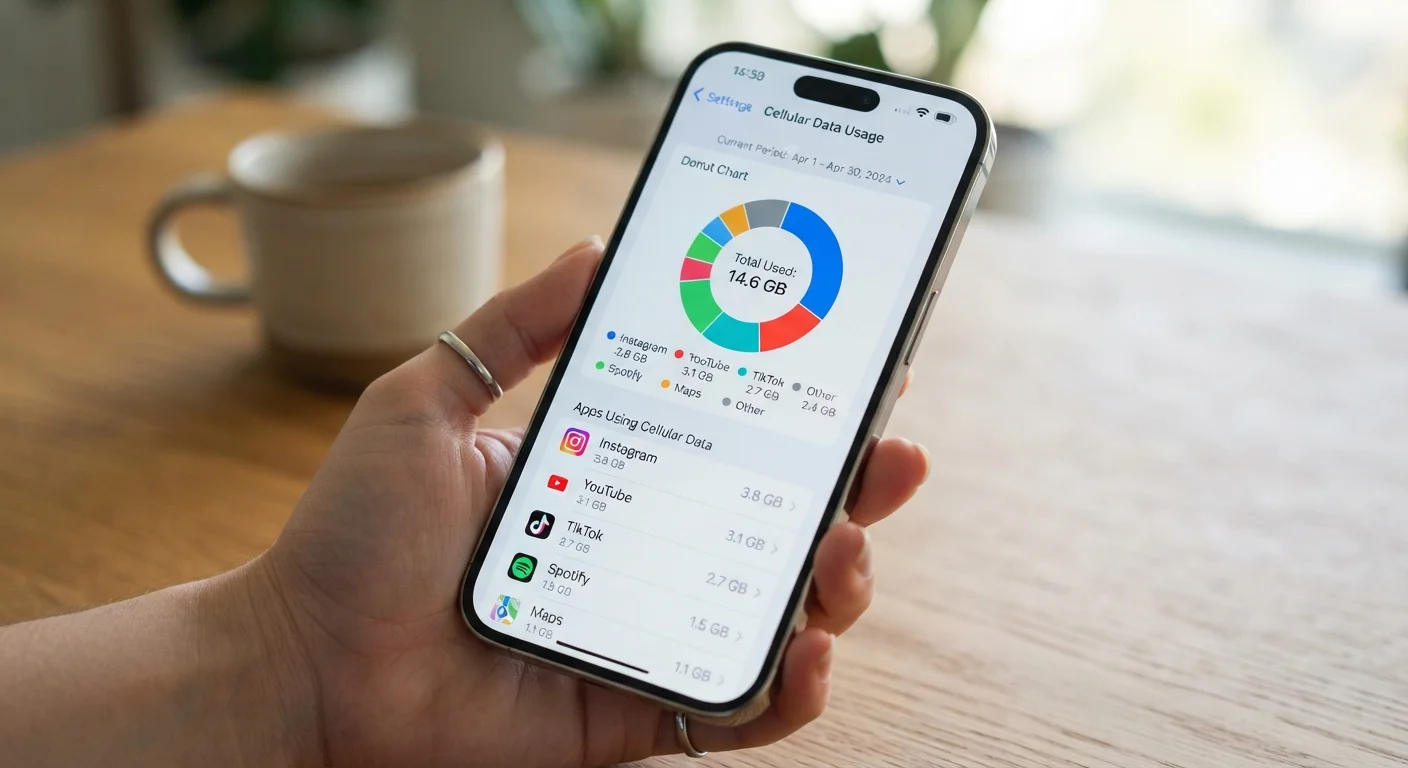
Both Android and iPhone have a built-in data usage screen inside Settings. On iPhone, go to Settings, then Cellular. On Android, go to Settings, then Network, then Data usage. Each screen shows a running total for the current period and a per-app breakdown sorted by consumption.
That breakdown is where the surprises show up. An app you rarely open consciously may appear near the top of the list because it refreshes aggressively in the background.
From that same screen, most phones let you restrict individual apps to Wi-Fi only, disable background data for specific apps, or set a usage warning that alerts you before you hit your cap. Understanding your data cap and what happens when you reach it is covered in more depth in the explainer on data caps.
Connecting to a trusted Wi-Fi network whenever you are at home or in a familiar location is the most straightforward way to preserve your monthly allowance for times when cellular is the only option.